
WhatsApp links & rotator
Create one short link for your ads, Instagram/TikTok bio, or website that opens a WhatsApp chat with a ready-to-send opening message — and shares each click in turn across several CS agents. cshub also counts clicks and can send conversion data to Meta Pixel / Conversions API so you can measure your ads.
Example: you put account.cshub.id/yourstore/promo in an ad. The first visitor is sent to agent Andi's WhatsApp, the second to agent Budi, and so on.
Link list
Open Link WhatsApp in the Marketing section of the sidebar.
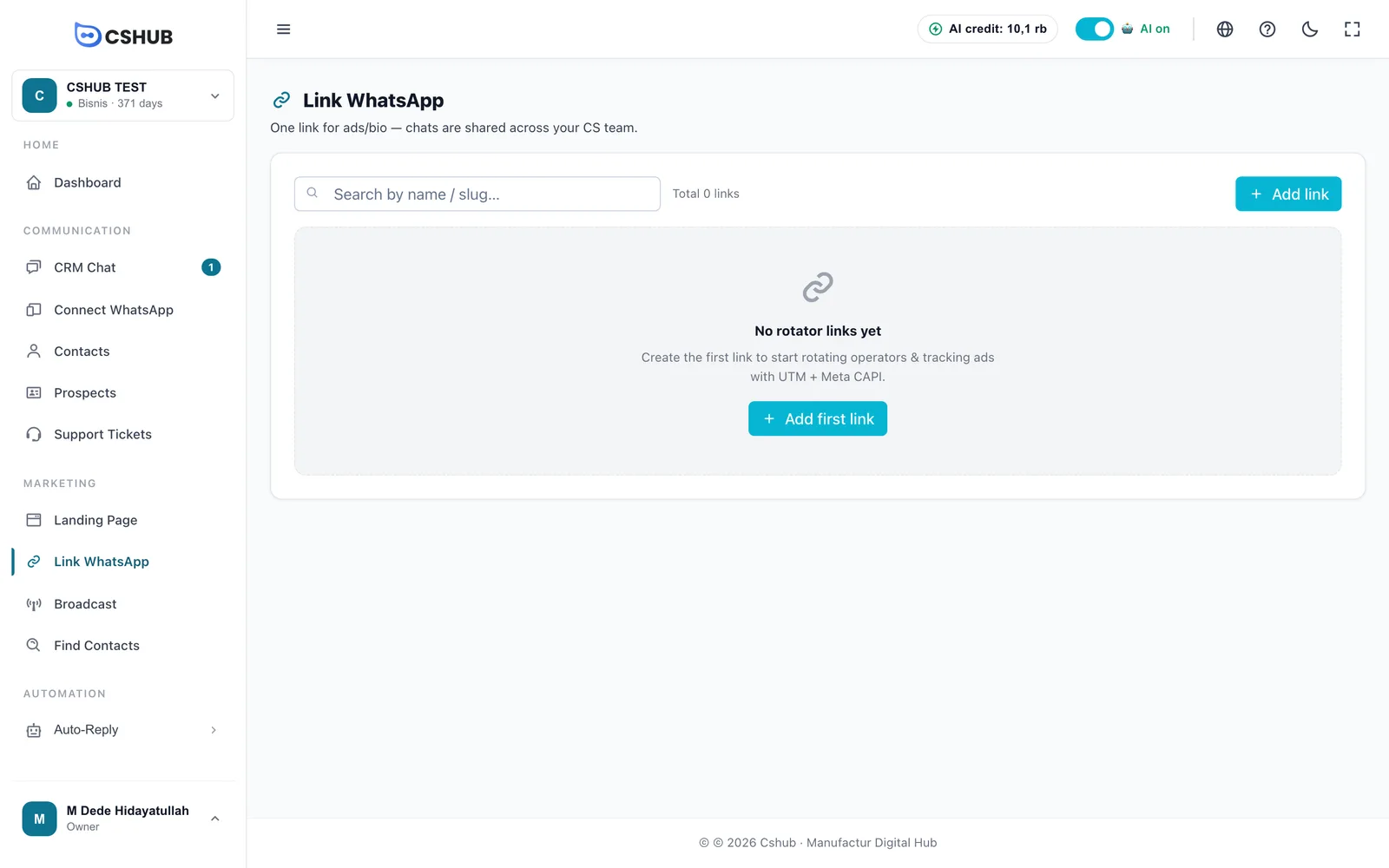
Once you have links, the table lists them all:
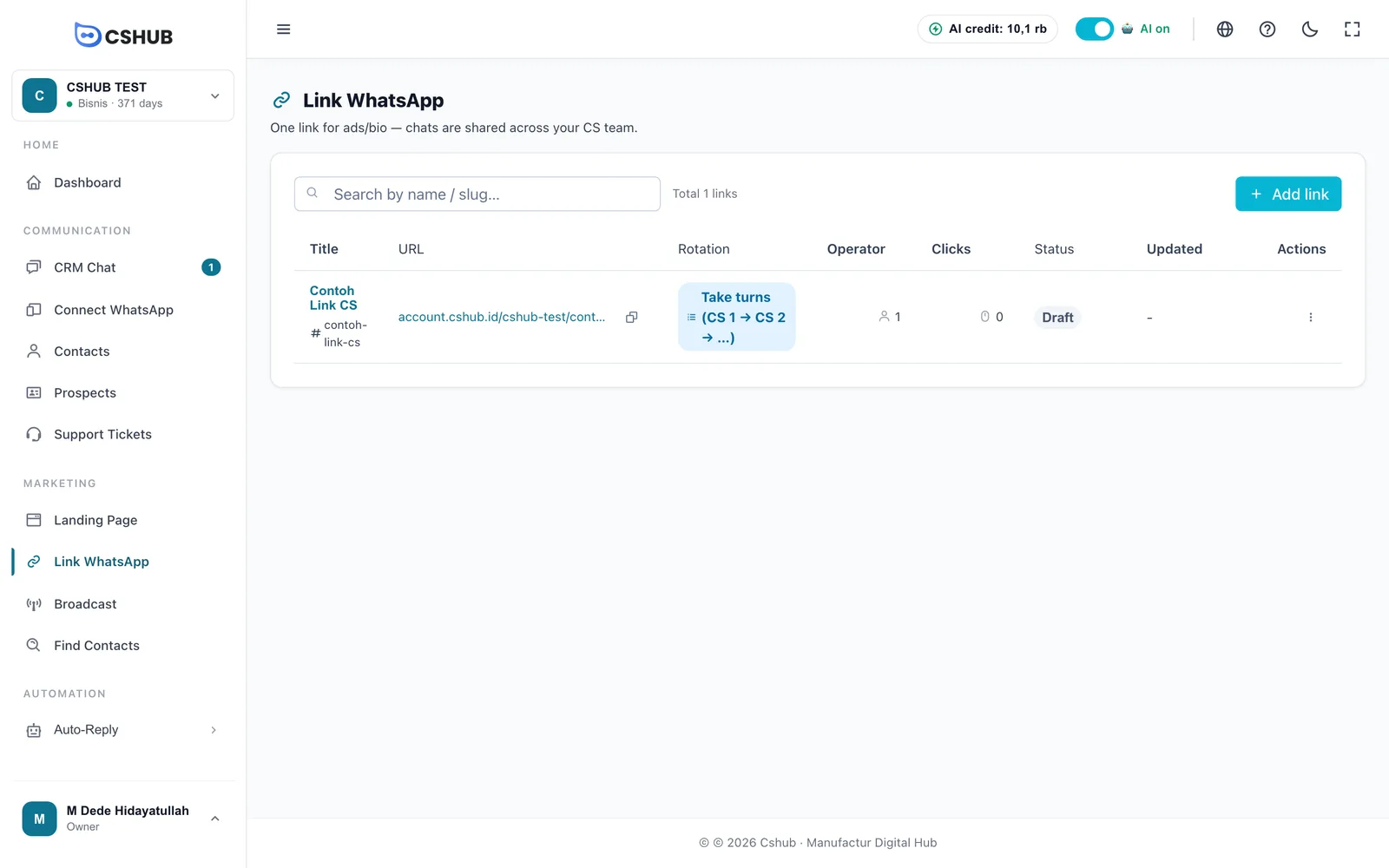
| Column | Contents |
|---|---|
| Title | Link name |
| URL | The link's public address — click to copy |
| Rotation | How chats are shared: Take turns or Random |
| Operator | Number of agents on this link |
| Clicks | Total clicks since the link was created |
| Status | Active, Draft, or Inactive. Click the badge to switch status |
| Updated | When it was last changed |
The ⋮ menu on each row contains:
| Action | What it does |
|---|---|
| Edit | Change the link |
| Duplicate | Copy the link and its agents. The new link is a Draft, its slug gets a -copy-… suffix, and the click count starts at 0 |
| Copy URL | Copy the link address to the clipboard |
| Share & Embed | Get the link and a WhatsApp button code for your website (see below) |
| Delete | Permanently delete the link with its click stats and agent list |
Creating a link
Click Add link.
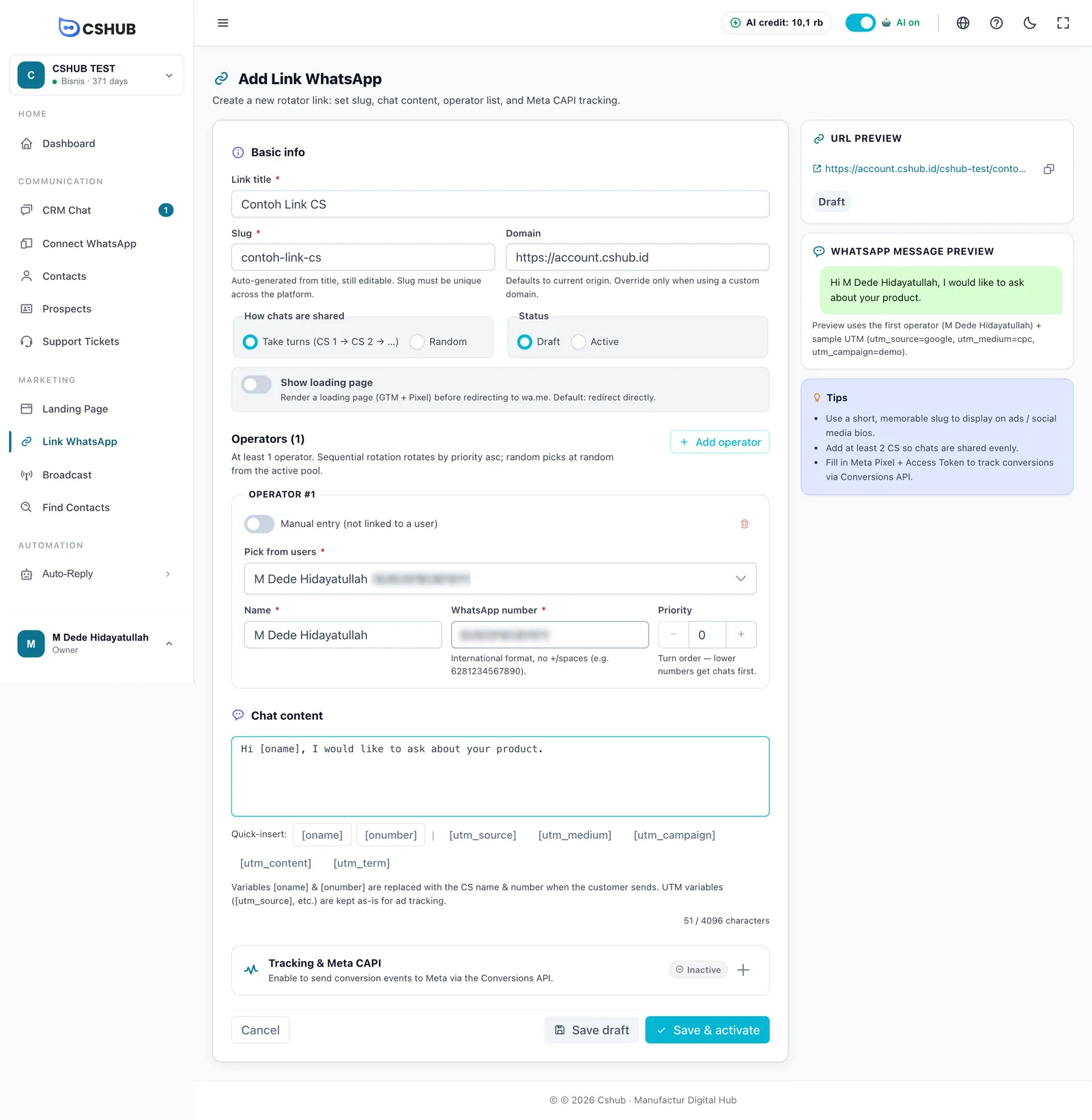
1. Basic info
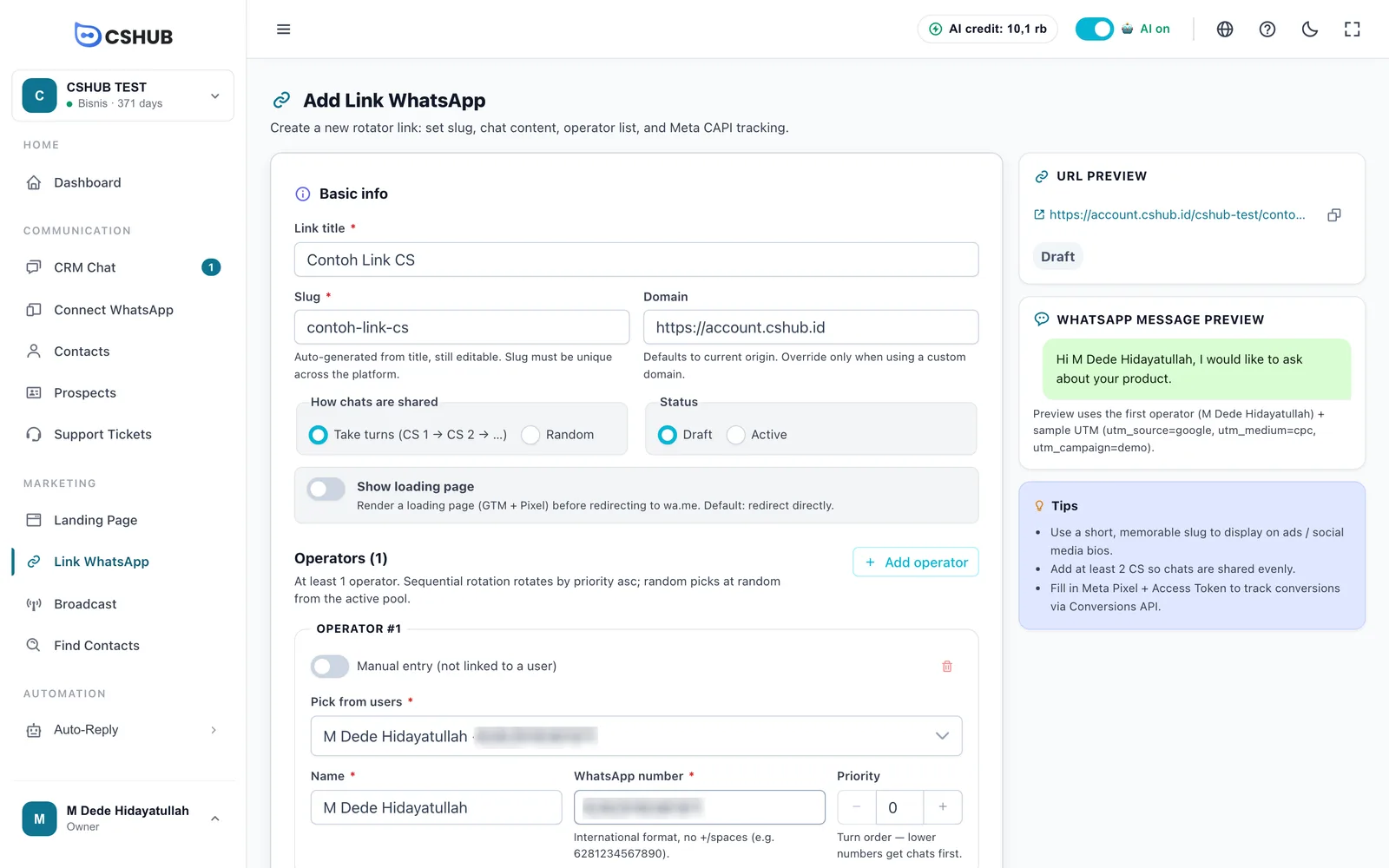
| Field | Description |
|---|---|
| Link title | Link name (max. 150 characters), e.g. Eid Promo 2026 |
| Slug | The last part of the link address. Filled in from the title and still editable. Letters, numbers, -, and _ only. Must be unique |
| Domain | Defaults to the cshub domain you are using. Change it only if you use your own domain |
| How chats are shared | Take turns (CS 1 → CS 2 → …) or Random |
| Status | Draft (not usable yet) or Active |
| Show loading page | When on, visitors see a short loading page (where GTM and Pixel run) before being sent to WhatsApp. When off, they are redirected straight away |
The URL preview panel on the right shows the full address — in the form domain/business-address/slug — with a copy button.
2. Operators (agents)
Operators are the agents who receive chats from this link. You need at least one; click Add operator to add more.
| Field | Description |
|---|---|
| Pick from users | Choose a team member. Their name and number are filled in from their account |
| Manual entry (not linked to a user) | Turn on to add an agent who has no cshub account |
| Name | Agent name (max. 100 characters) |
| WhatsApp number | International format without + or spaces, e.g. 6281234567890 |
| Priority | Turn order — lower numbers get chats first |
| Sharing mode | Behaviour |
|---|---|
| Take turns | Clicks go in order of priority: agent 1, agent 2, agent 3, then back to agent 1 |
| Random | Each click goes to a randomly chosen agent |
3. Chat content
Write the opening message that is pre-filled in the visitor's WhatsApp (max. 4,096 characters). The Quick-insert buttons add variables at the cursor:
| Variable | Replaced with |
|---|---|
[oname] | Name of the agent whose turn it is |
[onumber] | Also replaced with the agent's name (the customer already sees the number in WhatsApp) |
[utm_source], [utm_medium], [utm_campaign], [utm_content], [utm_term] | Left as they are — UTM tags are used for ad tracking, not message content |
The WhatsApp message preview panel shows the result using the first operator.
Chats land with the right agent
When the visitor sends that opening message, cshub recognises the chat came from this link and automatically hands the conversation in CRM Chat to the agent whose turn it was. This works for WhatsApp (scan QR) numbers. So keep the opening message reasonably long and different from your other links.
4. Tracking & Meta CAPI
Click the Tracking & Meta CAPI section to expand it, then turn it on.
| Field | Description |
|---|---|
| Meta CAPI trigger event | Event name sent to Meta. Default: Lead |
| GTM Container ID | Optional. Google Tag Manager ID (GTM-XXXXX) for extra events on the loading page |
| Meta Pixel ID | Meta Pixel ID for events in the visitor's browser |
| Meta Access Token (CAPI) | Optional, for Meta ads. Create it in Meta Business Suite → Settings → System users. When editing, leave it empty to keep the existing token |
| Test Event Code | Optional, for testing events in Meta Events Manager (Test Events) |
cshub sends an event when the link is clicked, then a conversion event when the visitor actually sends the WhatsApp chat — so Meta can optimise your ads toward people who really contact you.
GTM & Pixel need the loading page
GTM and Pixel code runs in the visitor's browser, so turn on Show loading page whenever you fill in a GTM or Pixel ID.
5. Save
- Save draft — save without activating. A Draft link cannot be used by visitors yet.
- Save & activate — save and make it live right away.
Share & Embed
Choose Share & Embed from the ⋮ menu in the link list.
- Link — the link address, ready to copy for your bio, ads, or messages.
- Website button — build a WhatsApp button for your website, then copy its Embed code.
| Button setting | Options |
|---|---|
| Button type | Floating in corner or Regular button |
| Position (floating) | Bottom left / Bottom right, plus Side offset and Bottom offset |
| Icon only (round), Pulse animation | Floating button style |
| Button text, Show WhatsApp icon | Button content |
| Button color, Text color, Size, Shape | Appearance. Shapes: Pill, Rounded, Square |
| Show on | All, Desktop only, or Mobile only |
| Open in new tab | Open WhatsApp in a new tab |
Paste the code into your website HTML — before </body> for a floating button, or where the button should appear for a regular one. The code has no JavaScript, so it is safe for WordPress and site builders. Agent rotation and tracking still apply. Copy the code again whenever you change the style.
Tips
- Use a short, memorable slug for ads and bios.
- Add at least 2 agents so chats are shared evenly.
- Make a separate link per campaign or ad platform so you can see clicks per source.
- Want a full landing page instead of going straight to WhatsApp? See Landing pages.